Troubleshooting
Despite numerous forms of automatic code generation and validation, it’s still possible to encounter misconfiguration where it’s not clear what has gone wrong. While a validation error will tell you what is wrong, it doesn’t do a lot to tell you where it is wrong. In these scenarios, a picture is worth a thousand words.
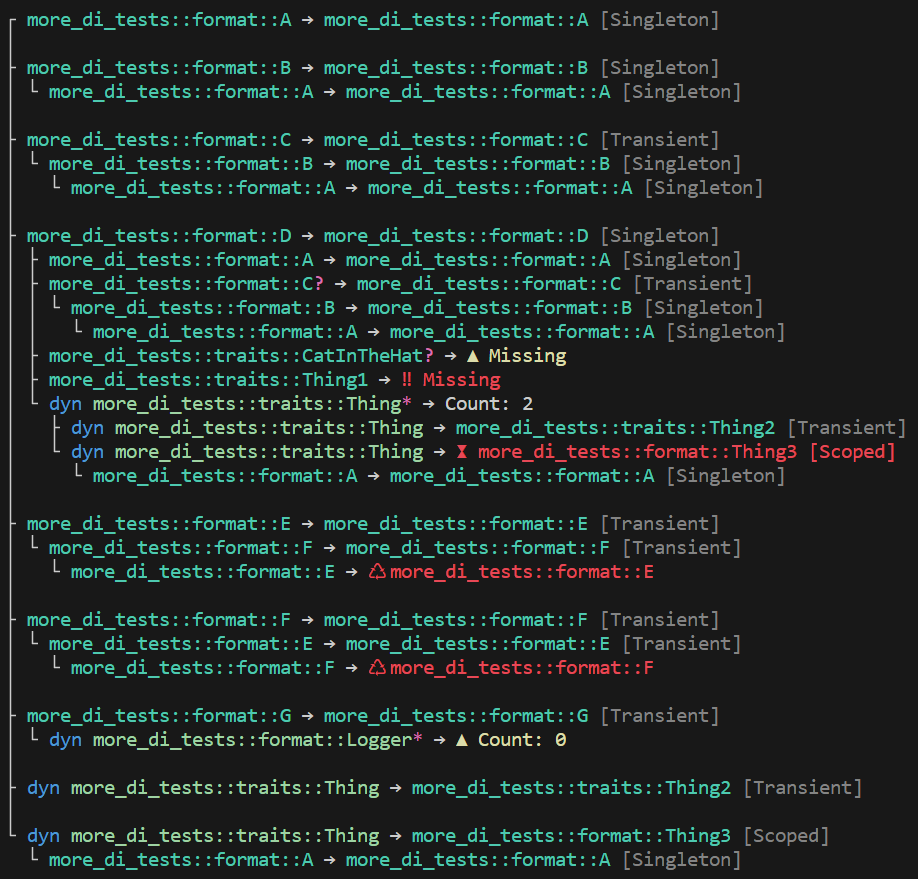
In order to make it easy to understand which services have been configured and for which types, ServiceCollection implements the std::fmt::Debug and std::fmt::Display traits. When the fmt feature is enabled and the alternate format option is specified (e.g. {:#}) the output uses terminal colorization. You might take advantage of this capability for debug output, logging, or one-off inspection.
use di::*;

#[injectable]
struct Bar;

impl Bar {
    fn do_work(&self) {
       println!("Hello world!");
    }
}

trait Foo {
    fn do_work(&self);
}

#[injectable(Foo)]
struct FooImpl {
    bar: Ref<Bar>,
}

impl Foo for FooImpl {
    fn do_work(&self) {
        self.bar.do_work()
    }
}

fn main() {
    let mut services = ServiceCollection::new();

    services.add(Bar::transient())
            .add(FooImpl::transient());

    // we can print the service collection at any time, including here:
    // println!("{services}\n");

    match services.build_provider() {
        Ok(provider) => {
            let foo = provider.get_required::<dyn Foo>();
            foo.do_work();
        },
        Err(validation_errors) => {
            // display the validation errors and entire service collection
            println!("{validation_errors}\n{services}");
        }
    }
}
A distinct difference between validation and display is that validation will only show errors, whereas display can show warnings and relationships.
Display Output
Symbols
?= zero or one*= zero or more⚿= service key▲= warning‼= error♺= circular reference⧗= lifetime
Warnings
- An optional service is missing
- A list has no registered services
Errors
These are the same errors detected and raised by validation
- A required service is missing
- A service has a circular reference
- A service with the lifetime
ServiceLifetime::Singletondepends on a service with the lifetimeServiceLifetime::Scoped
Example Output
The following example demonstrates outputting an entire service hierarchy, including warnings and errors.
Colorization is supported when the fmt feature is activated and the alternate format option is specified